Source Document Processing makes it easy to integrate paper source
documents into an automated tax workflow. It automatically organizes and
labels source documents and can even transmit data from those documents
into UltraTax CS. Here's how the process works:
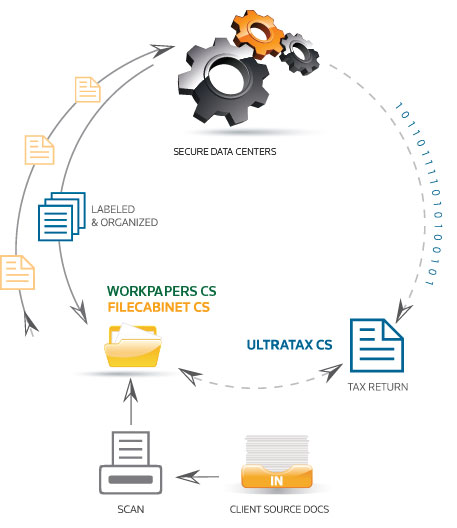
- The process begins when paper source documents from your client are
scanned into FileCabinet CS or Workpapers CS.
- Next, these scanned documents are sent from FileCabinet CS / Workpapers CS to
our data centers for Source Document
Processing. In this step, OCR technology is used to label each document,
organize related documents into groups, and produce a neatly labeled and
organized set of client source documents. OCR technology is also used to
capture data directly from the scanned source documents.
- After processing is completed, the labeled and organized client source documents are retrieved into FileCabinet CS / Workpapers CS. Each document is neatly labeled and related documents are grouped together,
so it's easy to navigate through your documents.
Note: Embedded PDFs may also be sent for processing.
For UltraTax CS users, the data captured
in step 2 can then be retrieved into the UltraTax CS Source Data Entry
module, where it can be verified, corrected as needed, and seamlessly
transferred into an UltraTax CS client's 1040 tax return.
The Source Document Processing Service offers firms a workflow strategy
that can save significant time, money, and staff resources, and substantially
reduce 1040 tax preparation time and costs.
View the forms supported by this service and other information in the
Source Document Processing fact sheet.
Process Additional Clients for Only $6 Per Client/Per Tax Year
Like what you see? The Source Document Processing service is available for only $6 per client per
tax year. You can also purchase a one-year unlimited license for $1,560.
1040 Source Document Processing
About This Video
See how Workpapers CS supports an automated 1040 workflow with strong tax organization templates and source document processing tools. (2:39)
<a href="/WorkpapersCS/" title="Workpapers CS product overview">Learn more about Workpapers CS</a>
Ensure the Most Accurate Results
Consider purchasing and installing scanning software that offers additional settings and
functionality to help clean up scanned images. Before you start scanning, please confirm your
scanner is set to the following:
- Black & White (not gray scale or color)
- 300 DPI
- Scan Area 8.5 x 11
- Contrast and black threshold should be set to medium
Questions?
For more information on the Source Document Processing service, visit FileCabinet CS, Workpapers CS, or UltraTax CS product pages and select the Source Document Processing tab. You can also call us at
800.968.8900, or contact us online.
Note: OCR (optical character recognition) is the mechanical
or electronic translation of images of typewritten or printed text into
machine-editable text. Because Source Document Processing relies on OCR
technology to read the various designs and formats of the forms scanned, the
degree of accuracy will vary.
Back to top