Source Document Processing
Streamline Source Document Management and 1040 Workflow
Want to see it in action? Watch a video demonstration of how
Source Document Management works
Our Source Document Processing service takes advantage of Optical Character Recognition
(OCR) technology and CS Professional Suite integration to speed tax workflow. Take advantage of
two great features. One, automatically label and organize your client source documents, making
them much easier to locate and identify in your electronic files. And two, automatically
extract data from the processed source documents for transfer directly into client tax returns
in UltraTax CS, reducing laborious data entry work. Here's
how it works:
Automatically Label and Organize Client Source Documents using
FileCabinet CS
You can get started by scanning, saving, and transmitting your client source documents
(e.g., W-2s, 1099s, brokerage statements, etc., including embedded PDFs) using FileCabinet CS. Next,
our host computers use OCR technology to quickly process your scans into neatly organized and
labeled client files. Then, you simply retrieve your nicely formatted client source documents
back into FileCabinet CS. Managing source documents has never been so easy!
Share Source Data in UltraTax CS with the Optional Data Extraction Feature
If you also use UltraTax CS and would like to speed tax paperless tax workflow
even more, you can take advantage of our data extraction feature. When we process source documents,
specific data (e.g., Form W-2 dollar amounts) is automatically extracted. If you choose, you can
have this extracted data transfer automatically to UltraTax CS, saving you hours of data
entry time.
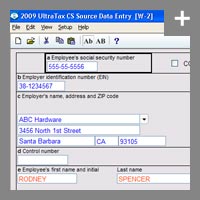
OCR processing makes it possible to automatically transfer source data
directly to the UltraTax CS return.
For more detail about this feature and the forms we support for data extraction, check out our
Source Document
Processing Service Fact Sheet.
Both timesaving features, labeling and organizing and optional data extraction are included for
just $6 per client, per tax year—no matter how many source documents the client has. You can also purchase a one-year unlimited license for $1,560.
Efficiency Gains = Time & Money Savings
Source Document Processing not only manages client source documents with ease and speeds
1040 processing, it also helps you effectively manage staff resources—saving you time and money.
Note: Source Document Processing relies on OCR technology to read the various
designs and formats of the forms you scan, and therefore the degree of accuracy
will vary.
Back to top