Depreciation Software For All Your Client Accounting Needs
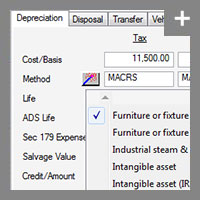
Many easy-to-use wizards assist with depreciation calculations.
One Size Fits All Depreciation Software
Whether you're a practicing accountant with many clients or a corporate accountant managing
assets for your business, Fixed Assets CS offers features that turn fixed asset management into
an efficient, well-organized process.
Automate Your Asset Tracking with Wizard Tools
Choose from several easy-to-use wizards and let them do the work for you. Like the like-kind
exchange feature in the disposal wizard, it quickly walks you through trading one asset for
another. Other wizards available include the method/life wizard, and an association wizard.
Take Advantage of Customizable Reports to Suit Your Needs
With Fixed Assets CS, you can choose from our library of standard reports or design and
print your own custom reports. The built-in reports can be easily customized to suit your needs.
You can also create a set of customized reports for particular clients or use the template to
create report profiles. Some examples are:
- Asset Detail
- Comparative
- Current Year Asset Additions
- Depreciation Projection
- Tax Property Detail
- Forms 4255, 4562, 4797, and Disposals FASB109, and 3468 Worksheet
- Asset Information
- MACRS Convention Detail
- Journal Entry
- AMT/ACE Basis Adjustment
- And several others
- Asset List
- Asset Labels
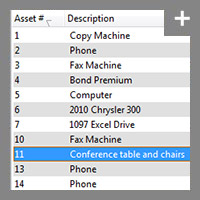
Depreciation software with flexible reporting options such as the Asset List report.
Streamline Your Workflow
Fixed Assets CS is part of the CS Professional Suite, so it shares data with the other suite applications saving you even more time and ensuring accuracy. Here are just a few examples of why this is so important:
- With Fixed Assets CS, you can enter assets all year long. Then, when you open a client's tax return in
our professional tax software, UltraTax CS, the assets you’ve entered throughout
the year are already there. And when you're ready to print a return from UltraTax CS, you can print a "Print
Profile" from Fixed Assets CS.
- With Fixed Assets CS, there's no need to estimate expenses—interim depreciation journal entries can be
imported right into Accounting CS.
- With the efficient importing and exporting capabilities you can import data directly from ASCII files and Microsoft® Excel®. Plus, the Excel import function offers data verification and easy field mapping, which can be shared between users for consistent data importing. And with the equally efficient export function, you can export data to Adobe® PDF, Excel, ASCII, and DIF files.
Back to top