Scanning
Fast and Efficient Scanning of all Documents
Scan documents in bulk and organize them with the highest degree of accuracy by leveraging
barcode and Optical Character Recognition (OCR) technology.
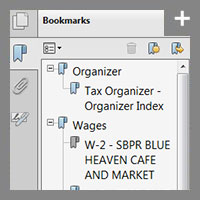
TaxSort allows you to customize bookmark categories to personalize your source document organization.
ScanFlow for Paperless Accounting
Begin by efficiently scanning in batch client files, so they are accessible to staff from the
start. Use barcode and indexing features to quickly and accurately scan documents and save them to
the appropriate location. Quality control and integrity features keep you apprised of changes that
occur during the scanning process. And, easy-to-use integration with Adobe® Acrobat® allows you to
scan documents into pre-defined Adobe bookmarks and create a single, nicely organized, bookmarked PDF.
TaxSort for Organizing Source Documents
Apply OCR technology to automatically identify and organize scanned 1040 source documents,
making client documents instantly ready for tax preparation and review. TaxSort addresses some
of the most time-consuming tasks associated with the busy tax season—organizing and scanning
client documents. And it even allows you to customize bookmark categories. Best of all, TaxSort has an automatic Append function that enables you to scan
late-arriving documents directly into the same PDF file.